Evaluating the Game Station Icon Pack for Modern Design Workflows
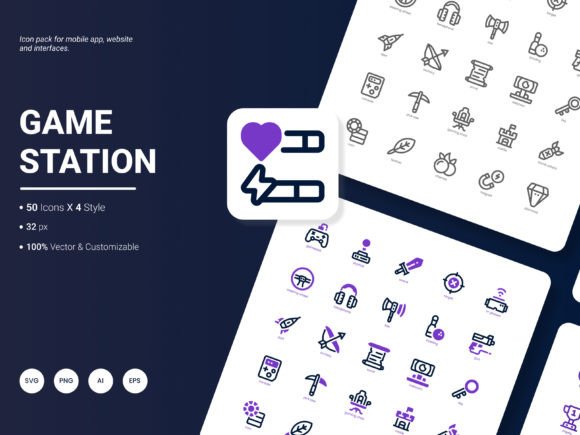
In the landscape of digital design, the quality and versatility of visual assets often dictate the efficiency of a project. The Game Station Icon Pack has emerged as a significant resource for professionals seeking to streamline their workflow while maintaining high aesthetic standards. Comprising 200 stylish icons that showcase popular services and ideas, this collection is not merely a set of graphics but a functional toolkit designed for website design, mobile applications, presentations, analytical reports, infographics, and templates. For designers aged 20 to 50 who are constantly weighing options between custom illustration and pre-made resources, understanding the specific value proposition of this pack is essential.
The distinctiveness of the Game Station Icon Pack lies in its balance between trendiness and utility. Unlike generic icon sets that may feel dated within a year, this collection is designed to be amazingly fresh and trendy, aligning with current UI/UX preferences. However, before integrating any asset into a production environment, it is prudent to examine its technical specifications, stylistic range, and how it compares to other approaches in the market.
Technical Specifications and Format Versatility
A primary factor in evaluating any graphic resource is its technical flexibility. The Game Station Icon Pack addresses this by offering icons in six distinct file formats: AI, EPS, SVG, PNG, PDF, and JPG. This breadth of availability is a critical advantage when comparing it against more limited alternatives that might only offer raster images (PNG or JPG) or vector files without web optimization.
- Vector Formats (AI, EPS, SVG): These are indispensable for scalability. If you are designing a dashboard that needs to look crisp on a 4K monitor and a mobile screen simultaneously, vector formats ensure no loss of resolution. The inclusion of SVG is particularly vital for web developers, as it allows for lightweight, scalable graphics directly embedded in HTML code.
- Raster Formats (PNG, JPG): While vectors are superior for editing, raster formats are necessary for quick mockups, email newsletters, or platforms that do not support vector rendering. The availability of these formats means the pack can serve immediate prototyping needs without requiring conversion software.
- Document Formats (PDF): Useful for print collateral or sharing high-quality previews with stakeholders who may not have Adobe Illustrator installed.
When comparing this to other resources, many free or budget-friendly packs restrict users to a single format, forcing them to use third-party tools for conversion—a process that can introduce errors or increase file sizes unnecessarily. The multi-format approach of the Game Station Icon Pack reduces friction in the design pipeline, allowing teams to move from concept to execution faster.
Stylistic Range and Editability
Beyond file types, the internal structure of the icons determines their long-term viability. The pack features four distinct styles, providing a level of variety that monochromatic or single-style collections cannot match. Whether a project requires a flat, minimalist look for a modern SaaS application or a more detailed, illustrative style for a gaming blog, having multiple variations within a single cohesive set ensures visual consistency across different deliverables.
Perhaps the most significant feature for professional workflows is editability. The icons are designed to be easily edited, meaning they are not locked-down bitmap images. Designers can adjust stroke weights, modify colors to match brand guidelines, or combine elements to create composite imagery. This contrasts sharply with "static" icon libraries where customization is impossible without redrawing the asset from scratch.
Consider a scenario where a client requests a rebrand with a new color palette. With an editable set like the Game Station Icon Pack, a designer can apply a global color change or tweak individual strokes in minutes. In contrast, non-editable alternatives would require sourcing a new library or commissioning custom work, significantly increasing project costs and timelines.
Comparing Approaches: Custom vs. Pre-Made Assets
When deciding whether to utilize the Game Station Icon Pack or pursue other avenues, it is helpful to compare it against the two main alternatives: custom illustration and free, uncurated stock resources.
Custom Illustration
Hiring a freelance illustrator to create 200 unique icons offers total creative control and exclusivity. However, this approach comes with a substantial tradeoff: cost and time. A custom set of this magnitude could take weeks to produce and cost thousands of dollars. For startups, small businesses, or agencies working under tight deadlines, this is often impractical. The Game Station Icon Pack serves as a middle ground, offering high-quality, professionally designed assets at a fraction of the cost and time of custom work, while still retaining enough flexibility for customization.
Free Stock Resources
Conversely, free icon repositories offer zero upfront cost but often suffer from inconsistency. Icons sourced from different creators rarely share the same line weight, curvature, or perspective, leading to a disjointed visual language. Furthermore, licensing terms for free assets can be murky, posing legal risks for commercial projects. The Game Station Icon Pack mitigates these risks by providing a curated, cohesive set with clear usage rights, ensuring that all 200 icons work harmoniously together. This cohesion is vital for maintaining a polished brand identity in presentations, infographics, and analytical reports.
Ideal Use Cases and Limitations
Understanding when the Game Station Icon Pack is the right choice—and when it might not be—requires looking at the specific demands of a project.
This pack excels in scenarios requiring speed, consistency, and broad applicability. It is an ideal fit for:
- Mobile Application Development: Where standardized iconography improves user experience and navigation clarity.
- Corporate Presentations and Reports: Where visual consistency reinforces data credibility and professional tone.
- Template Creation: For designers building reusable assets for clients or marketplaces.
- Gaming and Tech Services: Given the "Game Station" theme, the content is naturally aligned with popular services and ideas in the tech and entertainment sectors.
However, there are situations where this pack may not be the optimal solution. If a project demands highly niche, industry-specific iconography that falls outside the scope of "popular services and ideas," the existing 200 icons may not suffice. Similarly, if a brand relies on a hyper-specific, hand-drawn aesthetic that cannot be achieved through the provided four styles, custom illustration remains the superior choice. Additionally, while the pack is flexible, it is still a template-based resource; it cannot replace the strategic thinking required to determine which icons best communicate complex concepts.
Decision Factors for Integration
For professionals evaluating this resource, several decision factors should guide the final choice. First, consider the integration requirements. Does your team have the necessary software to leverage the AI, EPS, and SVG files? If your workflow is strictly web-based and you lack vector editing tools, the PNG and JPG versions will suffice, though you lose the ability to edit shapes.
Second, evaluate the content relevance. The pack focuses on popular services and ideas. Review the preview gallery to ensure the specific themes align with your project's narrative. If you are creating a medical app, for instance, verify that the pack includes relevant health-related icons, or if the general service icons can be adapted to fit that context.
Third, assess the long-term maintenance. Because the icons are editable and available in future-proof formats like SVG, the investment in this pack extends beyond a single project. As design trends evolve, the ability to tweak these icons ensures they remain relevant longer than static assets.
Future Considerations and Community Feedback
The evolution of design resources is often driven by user feedback. The creators of the Game Station Icon Pack have explicitly invited suggestions for future updates, indicating a commitment to adapting to market needs. When considering this pack, users should think about what gaps currently exist in their own workflows. Are there specific industries, emerging technologies, or abstract concepts that are missing from standard libraries?
Engaging with the developer community to suggest additions—such as icons for new AI tools, sustainability metrics, or decentralized finance—can shape the next iteration of the pack. This collaborative approach ensures that the resource grows alongside the industry, maintaining its status as a fresh and trendy option rather than becoming obsolete.
Ultimately, the Game Station Icon Pack represents a practical solution for designers who need to balance quality, speed, and flexibility. By offering 200 editable icons across six formats and four styles, it addresses many of the common pain points associated with asset management. While it may not replace the need for custom art in every scenario, it provides a robust foundation for a wide array of digital projects, empowering professionals to focus on strategy and innovation rather than getting bogged down in repetitive drawing tasks.