Game Shark: A Playful Font for Creative and Educational Projects
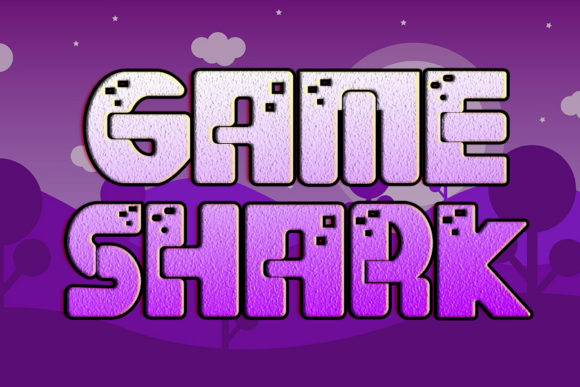
When it comes to designing materials for children’s activities or school-based projects, choosing the right font can make a significant difference in how engaging and effective the final product is. Game Shark is a bold, cartoon-like display font that brings a sense of fun and authenticity to any design. Its chunky, eye-catching letterforms are not just visually appealing—they’re also highly readable, making them ideal for capturing the attention of younger audiences while supporting learning and creativity.
Understanding the Role of Typography in Educational and Playful Design
Typography isn’t just about aesthetics—it plays a functional role in communication. In educational settings, the right font can help reinforce learning, improve readability, and even support cognitive development. For creative projects like posters, games, or activity books, a playful font like Game Shark can help set the tone and make the content feel more approachable and enjoyable.
However, finding a font that balances fun with legibility can be a challenge. Many playful fonts sacrifice clarity for style, which can make them difficult to read, especially for young children or those with learning differences. This is where Game Shark stands out—it combines a whimsical, cartoon-inspired look with clean, bold lines that ensure readability at a glance.
How Game Shark Meets Design Needs
Game Shark was designed with a specific purpose in mind: to bring energy and personality to projects that target children or educational audiences. Whether you're creating a classroom chart, a game board, or a birthday invitation, this font helps convey the right mood without compromising on usability.
- Chunky letterforms provide high visibility, even at smaller sizes.
- Cartoon-like style adds a sense of fun and whimsy.
- Strong character spacing improves readability and comprehension.
These features make Game Shark a versatile choice for a wide range of applications, from digital illustrations to printed materials. It’s particularly effective when used for titles, headings, or call-out text that needs to stand out and be easily understood.
Practical Applications of Game Shark
Let’s explore some real-world scenarios where using Game Shark can enhance both the design and the user experience:
1. Classroom Learning Materials
Teachers often create visual aids such as flashcards, charts, and posters to support lessons. Using a playful font like Game Shark can make these materials more engaging for students. For example, a multiplication chart using this font might feel less intimidating and more fun to interact with, encouraging students to engage more deeply with the content.
2. Children’s Books and Activity Pages
Children’s books and workbooks benefit greatly from fonts that are both readable and expressive. Game Shark works well for titles, captions, and character dialogue, helping to bring stories and activities to life. It pairs well with hand-drawn illustrations and can help create a cohesive, whimsical style throughout the book.
3. Game Design and Educational Apps
Whether you're designing a board game for the classroom or developing an educational app for kids, typography plays a key role in user interaction. Game Shark’s bold, friendly appearance makes it a great choice for buttons, instructions, and in-game text. It gives a sense of approachability and playfulness that aligns well with the goals of learning through play.
4. Party Invitations and Event Signage
For events like school fairs, birthdays, or after-school programs, using a fun and vibrant font like Game Shark can help set the tone. It’s perfect for banners, signs, and invitations that need to grab attention and convey excitement in a clear, readable way.
Who Benefits Most from Game Shark?
While Game Shark is especially well-suited for projects aimed at children, it can also be a valuable tool for a variety of users, including:
- Teachers and educators looking to enhance classroom materials.
- Graphic designers creating visuals for children’s media or educational content.
- Parents and caregivers making personalized learning tools or party materials.
- Game developers building interactive experiences for kids.
Each of these groups may approach the font differently based on their specific goals. For instance, a teacher might use it sparingly for headings to emphasize key points, while a game designer might incorporate it throughout the interface to maintain a consistent theme of playfulness and engagement.
Best Practices for Using Game Shark
To get the most out of Game Shark, consider the following tips:
- Use it for headlines and titles rather than long blocks of text. Its bold style works best when used for emphasis.
- Pair it with simpler fonts for body text to maintain readability and contrast.
- Test it in different sizes to ensure it remains legible across various formats, from printed handouts to digital screens.
- Combine it with bright colors to enhance its playful character and make your designs pop.
By following these guidelines, you can ensure that your use of Game Shark supports both the visual appeal and the functionality of your design.
Conclusion: Enhancing Creativity and Engagement with Game Shark
In today’s visually driven world, the right font can be a powerful tool for communication and engagement. Game Shark offers a unique combination of style and usability that makes it a standout choice for educators, designers, and creators working with children’s content. Whether you're designing a classroom poster, a storybook, or a game interface, this font can help bring your ideas to life in a way that’s both fun and functional.
By incorporating Game Shark into your next project, you’re not just adding a font—you’re enhancing the overall experience for your audience. Its bold, playful design helps foster a sense of joy and curiosity, making it a valuable asset for anyone looking to create memorable and impactful designs for kids and learners of all ages.