Game Weapon Skin Mockup: The Ultimate Tool for Realistic Design Presentation
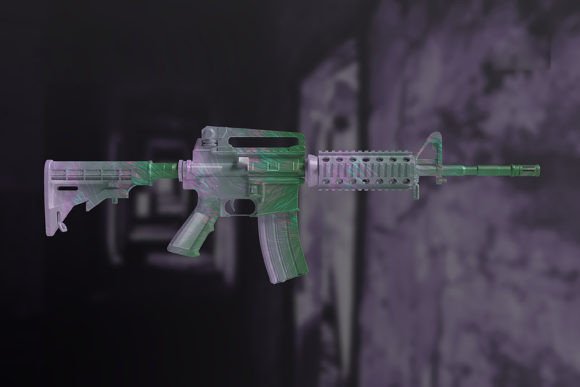
In the competitive world of digital art and game development, a flat image of a weapon design often fails to capture the true potential of your concept. Clients, investors, and fellow creators need to see how your artwork translates into a tangible, three-dimensional object within a gaming environment. This is where a Game Weapon Skin Mockup becomes an indispensable asset. It bridges the gap between a 2D illustration and a finalized in-game asset, allowing you to showcase your design in realistic appearances that resonate with your audience.
Whether you are a freelance illustrator pitching to a studio or a hobbyist sharing your work on social media, the ability to present your ideas professionally can make or break a project. A high-quality mockup does not just display your art; it sells the vision behind it by placing it in context, complete with lighting, texture, and perspective that mimic real-world physics.
Why Realism Matters in Digital Weapon Design
When designing skins for popular titles like Counter-Strike, Valorant, or Fortnite, the final look depends heavily on how light interacts with the surface. A simple JPEG of your texture map might look vibrant on a screen, but it lacks depth. Viewers cannot immediately tell if the metal will gleam under a spotlight or if the matte finish will absorb shadows correctly. This ambiguity can lead to miscommunication between designers and developers.
A Game Weapon Skin Mockup solves this problem instantly. By utilizing pre-rendered 3D models with advanced lighting setups, these files allow you to visualize your design as if it were already part of the game engine. This level of realism helps stakeholders understand the aesthetic direction without needing to wait for a full 3D implementation. It transforms abstract concepts into concrete visualizations, making the decision-making process faster and more confident.
The Power of Smart Objects for Rapid Iteration
One of the most frustrating aspects of traditional mockups is the time required to integrate new designs. Often, artists have to manually mask layers, adjust blending modes, and wrestle with complex transformations. The modern approach, however, relies on the smart-object feature found in Photoshop. This technology changes the workflow entirely.
With a smart-object-enabled mockup, changing the design takes mere seconds. You simply double-click the layer, paste your new artwork, save the file, and watch as the software automatically warps, shades, and integrates your design onto the weapon model. This efficiency is crucial for professionals who need to present multiple variations to a client during a single meeting. Instead of spending hours rendering different options, you can cycle through dozens of color schemes and patterns in minutes, ensuring you find the perfect fit without delaying the project timeline.
Real-World Applications Across Different Professions
The utility of a Game Weapon Skin Mockup extends far beyond a single niche. Various professionals leverage this tool to enhance their output in distinct ways.
Freelance Artists and Designers
For freelancers, presentation is everything. When bidding on projects on platforms like Upwork or Fiverr, your portfolio needs to stand out. Submitting a portfolio filled with flat textures makes you look amateurish compared to competitors who use realistic mockups. By presenting your work on a high-fidelity weapon model, you demonstrate technical proficiency and attention to detail. It shows clients that you understand the end product, increasing your chances of securing the contract.
Small Game Studios and Indie Developers
Indie developers often operate with limited resources and tight deadlines. They cannot always afford to hire a 3D artist to create custom renders for every skin they plan to release. A Game Weapon Skin Mockup serves as a cost-effective solution for creating marketing materials, store listings, and crowdfunding campaign visuals. It allows small teams to generate professional-grade promotional assets that rival those of AAA studios, helping them attract players and secure funding.
Educators and Content Creators
Teachers in digital art programs and YouTubers creating tutorials also benefit significantly from these tools. When explaining concepts like texture mapping, UV unwrapping, or material properties, showing a static image is less effective than demonstrating how a design looks on a 3D form. Educators can use these mockups to show students the practical application of their 2D skills, while content creators can produce engaging "before and after" videos that highlight the transformative power of good presentation.
Marketers and Brand Managers
In the realm of esports and gaming merchandise, marketing teams need compelling visuals to drive sales. Whether promoting a limited-edition skin drop or a physical collectible, the imagery must be striking. A realistic mockup ensures that the product looks desirable and high-quality, directly influencing consumer behavior. Marketers can test different background colors and lighting scenarios to see which version resonates best with their target demographic before launching a campaign.
Technical Specifications That Ensure Quality
Not all mockups are created equal. To ensure your final presentation looks crisp and professional, the underlying file quality matters immensely. A robust Game Weapon Skin Mockup typically comes with specific technical standards that guarantee versatility across various media.
- High Resolution: With dimensions of 3000 x 2000 pixels, these files provide ample resolution for both web use and large-format prints. This ensures that your design remains sharp even when zoomed in or viewed on high-density displays.
- Print-Ready DPI: A resolution of 300 DPI is the industry standard for print. If you ever need to create physical posters, business cards, or packaging for your game, these files are ready to go without pixelation or blurring.
- Flexible Backgrounds: The ability to change the background color or opt for a transparent background gives you total control over the composition. You can match your brand's color palette or remove the background entirely to overlay the weapon onto a custom scene.
It is important to note that while these files are powerful, they are designed as cohesive units. The objects within the mockup are not separated, meaning the weapon and its environment function as a unified whole to maintain lighting consistency. Additionally, users should be aware that any instructional text notes, images, or templates shown in preview galleries are usually not included in the final download unless specified. Always check the included instruction manual to maximize the tool's potential.
Choosing the Right Mockup for Your Needs
Before downloading or purchasing a Game Weapon Skin Mockup, consider your specific workflow and requirements. Are you looking for a quick turnaround for social media, or do you need a high-end render for a pitch deck? Understanding your end goal will help you select the right file format and style.
If you are new to Photoshop, look for mockups that come with clear, step-by-step instructions. The learning curve can be steep if you are unfamiliar with smart objects, but a well-documented file can get you up to speed quickly. Furthermore, consider the type of weapon depicted. Does it align with the genre of your game? A sci-fi blaster mockup won't serve a medieval fantasy project well. Matching the aesthetic of the mockup to your design ensures a seamless integration that feels authentic.
Ultimately, investing in a high-quality mockup is an investment in your professional reputation. It streamlines your workflow, enhances your visual storytelling, and elevates the perceived value of your work. By leveraging these tools, you empower yourself to communicate your creative vision with clarity and impact, turning great ideas into great products.